The other day my friend asked me to make a ring. I made it. And I made a DIY tutorial for it too:) I knew you would love it, right?
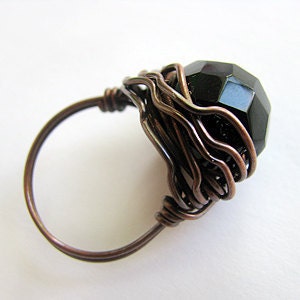
Tools and Materials:
- 20ga round dead soft wire – 2 ft
- 10 mm bead – 1
- Ring mandrel
- Chain nose pliers
- Wire cutters
- Liver of sulfur (optional)
 |
1. Cut a piece of 20ga round dead soft wire2 ft (61cm) long. 2. Place a 10 mm round bead in the middle of the wire. Bend the wire down as shown. |
 |
| 3. Place the wire with a bead around the ring mandrel mandrel at ½ size larger than needed. Wrap the wire around the ring. There is one wire on either side of a bead. |
 |
4. Wrap each wire around the bead, one side at a time and alternate sides. Your wires will end up in opposite directions. |
 |
| 5. Continue wrapping until you are satisfied with number of wraps or you have at least 2” of wire left on each side. |
 |
| 6. Take the ring from the mandrel. |
 |
7. Use the wire end to wrap around the shank. Make 2-3 wraps. Cut the wire. Tack the wire ends with chain nose pliers so they are not poking. |
 |
| 8. Repeat step 7 with another wire end. |
 | |
| Using bend nose (or chain nose) pliers, twist slightly some wires as shown. |
 |
| You may want to oxidize your ring as well. |
Play with different size and color of the bead and wire, and you will always have a different ring :)

Please do not distribute or copy.
See more tutorials at my Etsy shop
If you want to buy this rings click here.


Wow! Love it!
ReplyDeleteSo awesome! Thank you for sharing!!!
ReplyDeleteBeautiful ring! Thank you for sharing the tutorial!
ReplyDeleteThe link to your etsy store is broken. I tried right clicking and copying the link to paste and fix in my browser, but you have a javascript hack preventing right clicking. That's also a little annoying when I highlight Ring Mandrel with the intent to right click and google search for where to buy one. You are preventing more than copying when you disable right-clicking (such as open in new tab, open in new window, etc...). You aren't even preventing copying when you do this. Highlight & CTRL-C works just fine. You're just making things difficult for your readers with this.
ReplyDeleteSorry for inconvenience :(
ReplyDeleteProblem fixed :)